
The businesses that get the most out of a demo are not the ones with the most calls. They are the ones who showed up already knowing their own numbers.
By Derrick L. Houston, Founder of DH Digital Consulting
Your business is ready for an EchoAssist demo once you can answer seven basic questions about how your phone actually works today: your hours, your call volume, the types of leads that call you, your service area, the questions callers ask most, how booking works now, and how you want to be notified when a call comes in. None of these require a perfect answer. They just need to be answers you have actually thought about before the call starts.
This checklist exists so the demo spends its time on your business instead of on background questions that could have been answered ahead of time. The more prepared you are, the more useful the conversation becomes.
Key Takeaways
- A useful demo depends on you knowing your own numbers, not on the technology itself.
- The average small business misses well over half of its incoming calls, according to research from 411 Locals, so most owners are working with a bigger gap than they realize.
- Response speed matters enormously. The MIT and InsideSales.com research found leads contacted within five minutes are 21 times more likely to qualify than leads contacted after thirty minutes.
- This checklist covers seven areas: hours, call volume, lead types, service area, common questions, booking process, and notification preferences.
- Coming prepared turns the demo into a real evaluation of fit, not a generic product tour.
Why Preparation Changes What a Demo Can Show You
A demo built around a generic script tells you what the product can do in theory. A demo built around your actual hours, your actual service area, and your actual caller questions tells you what the product will do for your business specifically. That difference matters more than most people expect going in.
I have run demos both ways. When an owner walks in without having thought through their own call patterns, we spend the first half of the conversation reconstructing basic facts about their business, information they already know but have never had to say out loud. When an owner walks in with the seven answers below already worked out, we spend that same time actually building the setup and testing it against their real scenarios. Same amount of time. Very different outcome.
This is not about performing for the demo. It is about getting a clear, honest picture of whether an AI receptionist fits how your business actually runs, and that picture only comes into focus once you know your own numbers.
The Numbers Behind Why This Matters
Research from 411 Locals, which reviewed 85 businesses across 58 industries in 2024, found that only about 38 percent of incoming calls were answered by a live person, meaning most small businesses miss well over half of their calls. That statistic is the reason this checklist starts with call volume. Most owners underestimate how many calls they are actually missing, because a missed call rarely feels significant in the moment it happens.
Speed compounds the problem. The MIT and InsideSales.com Lead Response Management Study, which analyzed more than 100,000 call attempts across six companies, found that leads contacted within five minutes were 21 times more likely to qualify than leads contacted after thirty minutes. For real estate specifically, the National Association of Realtors’ 2025 Home Buyers and Sellers Generational Trends report found that 78 percent of buyers end up working with the first agent who responds to them.
None of that data is meant to pressure you into a decision. It is meant to explain why this checklist asks the questions it does. Call volume, response speed, and lead type all directly shape what a working setup needs to look like for your business, and a demo can only reflect that if you walk in already knowing the answers.
The Reframe: A Demo Should Test Fit, Not Sell a Feature List
Most product demos are built to show off everything the tool can do. That approach works fine for software you will explore slowly, on your own time. It works poorly for something like call handling, where the real question is not “what can this do in general” but “does this fit how my specific business actually operates.”
The right way to think about a demo is less like a product tour and more like a fitting. You bring your actual measurements, your actual constraints, and you find out whether the thing fits, where it needs adjusting, and where it does not fit at all. That only works if you show up with your own numbers instead of expecting the demo to hand you a generic answer.
What Preparing Actually Looks Like
When I sit down with a real estate agent or a service business owner for a demo, the conversations that go best are the ones where the owner has clearly spent fifteen minutes thinking through their own operation beforehand. They are not more technical. They are not bigger businesses. They just walked in knowing their hours, their rough call volume, and what a typical caller usually asks.
That preparation does something specific: it turns the demo from a hypothetical conversation about what an AI receptionist could do into a concrete conversation about what it would actually do on your phone line, this week, with your callers. The checklist below is built directly from the questions that come up in every one of those conversations, in the order they tend to matter most.
The Pre-Demo Checklist
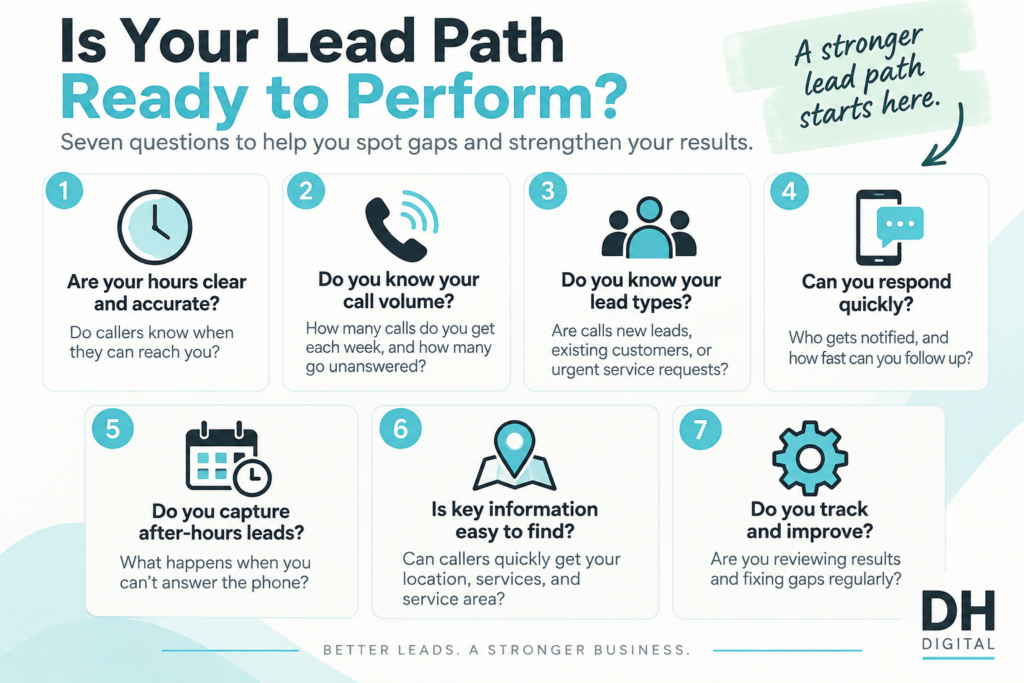
- Know your business hours, including what “after hours” means for you. Some businesses close at 5pm sharp. Others take emergency calls at any hour. Be specific about which category you fall into and whether that changes by day of the week.
- Get a rough sense of your call volume. You do not need an exact count. A rough range, ten calls a day versus fifty, changes what kind of setup makes sense and helps you evaluate pricing against your real usage.
- List the two or three types of leads that call you most. A plumber might get emergency repairs, routine maintenance, and quote requests. A real estate agent might get buyer inquiries, seller inquiries, and general questions from people who are not ready to transact yet. Each type may need different qualifying questions.
- Define your service area clearly. Know the cities, neighborhoods, or radius you actually serve, and whether you want calls from outside that area routed differently or declined politely.
- Write down the five questions callers ask most often. Pricing, availability, whether you handle a specific job type, how soon you can come out. These become the core of what your AI receptionist needs to be able to answer confidently.
- Map out how booking works today. Do you use a calendar app, a paper schedule, a CRM? Knowing your current process makes it much easier to see how call handling would connect to it.
- Decide how you want to be notified when a call comes in. Text message, email, a CRM entry, all three. This is a small detail that makes a large difference in whether the system actually fits into your day once it is live.
Frequently Asked Questions
What if I do not know my exact call volume?
A rough estimate is enough. Count your calls for a single typical day, or check your phone’s call log if it tracks incoming calls, and use that as a starting point. Precision matters less than having thought about it before the demo.
Do I need a CRM already in place to benefit from an AI receptionist?
No. Many businesses run on a simple calendar or even a paper system when they start. Knowing your current process, whatever it is, helps the demo show you how call handling would fit into what you already do, rather than requiring you to change everything at once.
How specific do my service area boundaries need to be?
As specific as you can make them. Neighborhoods, cities, or a mile radius from your base of operations all work. The goal is clarity, so calls from outside your area can be handled appropriately instead of treated the same as calls from your core market.
What if my business gets a wide variety of call types?
List the two or three most common categories rather than trying to capture every possible variation. Most businesses have a handful of recurring call types that make up the majority of their volume, even if the exact details vary.
Is this checklist only useful before an EchoAssist demo, or does it help with any AI receptionist evaluation?
The seven questions apply to any AI receptionist evaluation, not just EchoAssist. They reflect the basic operational details any call-handling setup needs to work well, regardless of the specific provider.
Show Up Ready, Get a Real Answer
The businesses that get the most value out of an EchoAssist demo are not the ones with the most polished operation. They are the ones who took fifteen minutes beforehand to answer these seven questions honestly. That preparation is what turns a generic product conversation into a real answer about whether this fits your business.
Work through the checklist above before your demo. It costs you fifteen minutes and gives you a far more useful conversation in return.
Book Your Free EchoAssist Demo
Once you have worked through the checklist, book your free EchoAssist demo and bring your answers with you. See how EchoAssist handles your specific hours, service area, and caller questions, built around your business from the first call.
Keep Learning
- What an AI Receptionist Should Know About Your Business Before It Answers a Call: A deeper look at the business details that shape a strong setup.
- How to Prepare Your Business for Better Lead Qualification: A framework for refining the qualifying questions your call handling should ask.
- AI Receptionist vs. Hiring a Receptionist: How to Compare the Two Options: A side-by-side comparison if you are still deciding between coverage options.
- How an AI Receptionist Works for a Busy Home-Service or Real-Estate Business: A plain-language walkthrough of what to expect once your setup goes live.
About the Author
Derrick L. Houston is the founder of DH Digital Consulting, LLC, based in Dallas-Fort Worth. He built EchoAssist, an AI receptionist service for real estate agents and small service businesses, and has run demos with owners across both industries. Derrick built this checklist directly from the questions that come up in nearly every one of those conversations.