
TLDR
AI tools for non-technical owners are built around plain-language typing, not code, so the fear of being too far behind to start is understandable but not accurate; you already have the only skill these tools require, which is the ability to describe what you need in your own words. The barrier most owners picture, writing code or understanding complex systems, does not exist in the tools built for small business use. What actually slows people down is not knowing where to start, not a lack of technical ability.
You do not have to be a computer person for AI. That sentence alone probably describes a fear you have not said out loud, the worry that everyone else figured out some technical trick you missed. It is a reasonable fear. It is also based on an outdated picture of what these tools actually require.
The core idea behind most AI tools for non-technical owners is simple: they respond to plain English. You type a sentence the way you would text a colleague, and the tool interprets it, no syntax, no formulas, no code. That is the whole interaction. If you can describe a problem out loud, you can use these tools.
Key Takeaways
- AI tools for non-technical owners are built around plain typed language, not code.
- The fear of falling behind is common and understandable, but research shows the real barrier is confidence and direction, not skill.
- Developer-facing AI and owner-facing AI are different categories built for different users.
- Tools like EchoAssist AI and GoHighLevel run on typed instructions and everyday sentences.
- Starting with one repetitive task is more effective than trying to learn AI as one broad subject.
Fun Fact
Google’s own guidance for its workplace AI tool puts the bar this low: if you can write an email, you can use it. The instructions are that simple by design, not by accident.
Expert Insight
In my work with real estate agents and small service business owners, the pattern I see most often has nothing to do with technical ability. Owners who describe their business clearly to a person also describe it clearly to an AI tool, and that is the entire skill required. The ones who stall out are not stuck on syntax; they are stuck on not knowing which task to hand off first. Once they pick one task and type a plain request, the fear usually resolves within a single session.
Why does AI feel technical when it is not?
AI feels technical because early software required specialized knowledge to operate, and that association carried forward even though modern AI tools were specifically designed to remove that requirement. The mental image of AI still borrows from decades of software that demanded manuals, training sessions, and IT support. Small business AI tools broke from that model on purpose. They were built for people running plumbing companies, salons, and real estate offices, not software engineers.
The confusion comes from mixing up two different things: the complexity happening behind the scenes and the complexity you experience as the user. A tool can run on advanced systems and still ask you nothing more complicated than a question you would ask a coworker.
The technology got harder to build and easier to use at the same time.
That gap between backend complexity and frontend simplicity is exactly what makes these tools usable by someone with no technical background.
What is a non-technical AI tool?
A non-technical AI tool is software that accepts plain-language instructions and responds without requiring code, formulas, or specialized training, letting an owner type a request the same way they would send a text message. These tools translate everyday language into the actions a computer needs to perform. You provide the intent; the tool handles the mechanics.
Examples already common in small business work include AI schedulers that book appointments from a typed request, AI writing assistants that draft a service description from a few sentences, and AI receptionists like EchoAssist AI that answer calls and route messages without a human typing anything at all. None of these require you to understand how the system works internally. You only need to know what you want it to do.
- You type a request in normal sentences.
- The tool interprets intent, not exact syntax.
- Mistakes in phrasing rarely break the result.
- No installation, scripting, or setup language is required.
Do you need coding skills to use AI in your business?
No, coding skills are not required to use AI tools built for small businesses, because these tools are designed around conversational input rather than programming syntax. Google Workspace states this directly: if you can send an email, you can use their AI assistant Gemini, because the interaction is built on written requests, not commands.
This distinction matters because it separates two very different populations of AI tools. Developer-facing AI tools do require code, and they are built for engineers integrating AI into custom software. Owner-facing AI tools sit on the opposite end. They are built to be typed to, the same way you would type a message to an assistant.
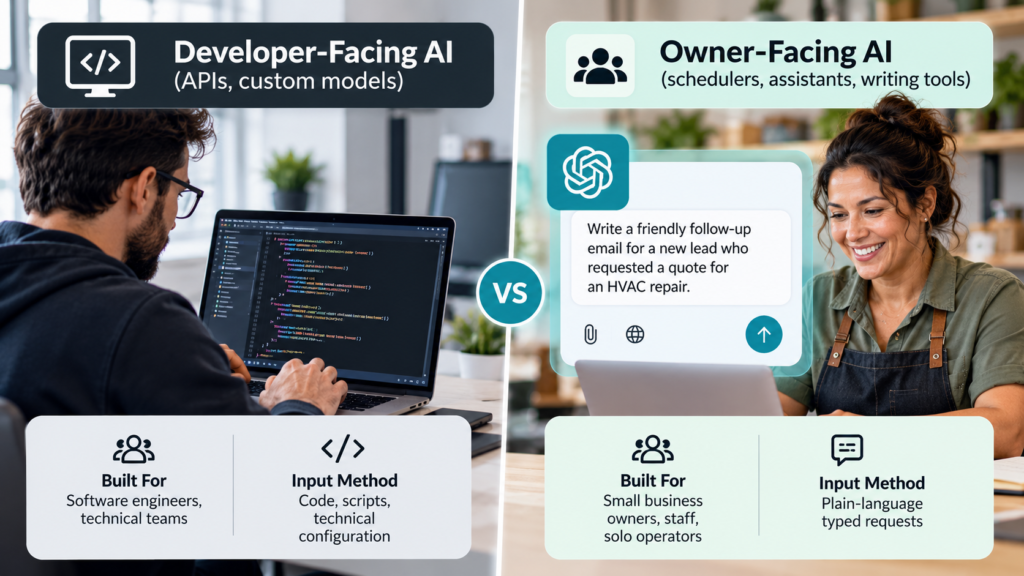
Once you see the split laid out this way, the fear starts to lose its grip. You were never being asked to become the first kind of user.
Why do so many owners feel behind before they start?
Owners feel behind because AI moved into public conversation quickly and loudly, creating the impression that everyone else already mastered it, when in reality most owners have not started either and the barrier is confidence, not competence. Research from Xero’s small business AI readiness study found that the biggest obstacles are competing priorities and inertia, not a skills gap. Owners are busy running the business, not sitting behind on a technical curve.
Goldman Sachs surveyed small business owners already using AI and found that 45 percent still cite a lack of technical expertise as a barrier, and 88 percent want more training and support. That tells you something important: even people using these tools feel unsure, and they keep going anyway. Uncertainty is normal, not a sign you are behind.
Feeling behind and being behind are not the same thing.
Inc. Magazine reported on Anthropic’s small business tour and found that 81 percent of owners are open to using AI, but their top pain point is not knowing how or when to use the tools, not an inability to operate them. Short, plain-English workshops closed that gap fast. The missing piece was direction, not skill.
How do plain-language AI tools actually work day to day?
Plain-language AI tools work by taking a typed request, matching it to an available action inside the software, and completing that action or drafting a response for your review, so the daily experience feels like giving instructions to an assistant rather than operating a program. You type what you want. The tool does the translating.
A property manager might type a request to draft a listing description, and the tool produces a paragraph in seconds instead of an hour. A contractor might type a follow-up message for a client who has not responded, and the tool writes it in the contractor’s own tone. Platforms like GoHighLevel (GHL) build entire workflows around this pattern, letting non-technical users automate follow-ups, texts, and reminders without touching a line of code.
- Type the outcome you want in plain sentences.
- Review the draft or action the tool produces.
- Adjust wording if needed, in the same plain language.
- Approve or send.
The skill AI actually requires is the ability to describe what you want.
That skill is one every business owner already has, because it is the same skill used to train an employee or explain a job to a contractor.
If you want to see this pattern applied directly to a common small business task, EchoAssist AI answers this need for phone coverage without requiring any setup beyond describing how you want calls handled.
What should a non-technical owner look for in an AI tool?
A non-technical owner should look for AI tools that accept typed, conversational requests, require no installation of specialized software, and offer visible drafts or previews before anything gets sent or published. Those three traits filter out tools built for developers and point you toward tools built for operators.
- Plain-language input with no required syntax.
- A preview or draft step before anything goes live.
- Clear undo or edit options.
- Support or onboarding written in everyday language, not technical documentation.
If a tool’s own marketing talks about APIs, integrations, or configuration before it talks about what problem it solves, that is a signal it was built for a different audience. The tools built for owners lead with outcomes: book more appointments, answer calls faster, write listings quicker.
Consider how this compares across a few common categories owners already recognize:

What can I do this week to get started without technical experience?
You can get started this week by picking one repetitive task, such as answering calls or drafting follow-up messages, and testing a single AI tool built specifically for that task using plain typed instructions rather than trying to learn AI broadly. Starting narrow removes the overwhelm that comes from treating AI as one giant subject to master.
Write down the exact sentence you would say to a new employee if you were training them to do that one task. That sentence is almost always the same sentence you would type into an AI tool to get started. This is the shortcut most owners miss.
You already know how to explain your business; that is the only input these tools need.
If you tried something years ago and it felt clunky, current tools are not the same generation. The plain-language interaction has become the standard, not the exception, across schedulers, writing assistants, and phone systems built for small business use.
Frequently Asked Questions
Do I need to know how to code to use AI in my business?
No, you do not need coding knowledge for AI tools built for small business owners. These tools are designed to accept typed, plain-language requests, and the underlying system handles the technical translation without any input from you.
What is the easiest AI tool for a non-technical business owner to start with?
The easiest starting point is a single-purpose tool tied to one task you already do often, such as call answering or message drafting. Tools like EchoAssist AI focus on one job, which keeps the learning curve small and immediate.
How do I know if an AI tool is too technical for me?
You can tell a tool is too technical if its setup process asks you to configure code, APIs, or integrations before you can use it. Tools built for non-technical owners ask you to describe what you want in sentences, not settings.
Why do small business owners feel behind on AI even though most have not started yet?
Owners feel behind because AI became a loud public topic quickly, creating a false impression that adoption is further along than it actually is. Surveys from Xero and Goldman Sachs both show that most owners are still early in adoption and that hesitation is common, not rare.
Can AI really understand plain English requests without special phrasing?
Yes, modern small business AI tools are built specifically to interpret natural sentences rather than exact commands. Minor differences in wording rarely change the outcome, because the tool is matching your intent, not a fixed script.
What is the difference between AI built for developers and AI built for business owners?
Developer-facing AI requires code and technical configuration and is built for engineers integrating AI into custom systems. Owner-facing AI accepts typed, conversational requests and is built for people running a business day to day, with no programming involved.
Next Steps
The fastest way to move past the fear is to hand off one task and see the plain-language interaction in action for yourself. Start with a done-for-you AI product: Our Services.