
TLDR
Industry-specific AI tools are built around the actual workflows of real estate and home service businesses, so the fastest way to tell if a tool fits your industry is to ask the vendor three direct questions about data, workflow, and escalation before you sign anything. Generic AI tools can answer questions and draft messages, but they don’t know what an MLS listing status means or why a homeowner calling about a leak at 9 p.m. needs a different response than a routine scheduling request. This post walks through three concrete questions to ask any AI vendor, with real estate and home service examples for each, so you stop guessing and start evaluating.
Key Takeaways
- Industry-specific AI tools are trained on the data structures and language of a field, not just general conversation.
- Ask whether the tool understands your source data, such as MLS fields or job scheduling systems, before anything else.
- Ask how the tool handles edge cases, like a stalled closing or an emergency service call, not just the happy path.
- Ask what happens when the AI needs to hand off to a human, and how fast that handoff actually happens.
- Vague phrases like “AI-powered” without specifics are a warning sign, not a selling point.
Fun Fact
Multiple listing service, or MLS, databases use hundreds of standardized field codes, and real estate agents often write informal shorthand inside free-text fields, like “ss apps” for stainless steel appliances. A generic AI tool trained on general internet text has no reason to know that shorthand. An AI tool built for real estate has usually seen thousands of these listings and learned the pattern.
Expert Insight
In my work with real estate agents and small service business owners, the biggest mistake I see is buying an AI tool based on a demo instead of a stress test. Demos show the happy path: a clean question, a clean answer. Real work is messier. A homeowner calls about a burst pipe at midnight, or a buyer asks about a listing that just went pending.
The demo tells you what a tool can do. The edge case tells you what it will actually do for your business.
Ask vendors to show you the messy scenario, not just the polished one.
What Are Industry-Specific AI Tools?
Industry-specific AI tools are software built on top of AI models but trained, structured, and configured around the actual data, terminology, and workflows of a particular field, such as real estate transactions or home service dispatching. A generic AI chatbot can hold a conversation. An industry-specific tool understands what a pending sale means, what a service window is, and how those events trigger the next step in a workflow. The difference shows up the moment a conversation gets specific instead of general.
Owners in real estate and home services are being pitched AI tools constantly right now. Some are genuinely built for the work. Others are general-purpose chat interfaces with a real estate or home service skin slapped on top. The three questions below help you tell which is which before you spend money finding out the hard way.
Question One: Does the Tool Understand Your Actual Data?
The first question to ask any AI vendor is whether the tool was built to read and act on your specific data sources, such as MLS feeds for real estate or job scheduling platforms for home service businesses, rather than generic text. A tool that only processes plain English sentences will miss the structured information that drives your business. Ask the vendor to show you, live, how their tool handles a real listing or a real work order from your world.
For a real estate example, ask the vendor to pull up an active MLS listing and have the AI summarize it for a buyer inquiry. Does it correctly identify the listing status, the days on market, and any pending contingencies? A tool built for real estate should also recognize agent shorthand in the notes field. If the vendor can’t demonstrate this with a live listing, the tool likely wasn’t built around MLS structure at all.
For a home service example, ask the vendor to show how the AI reads a job in your scheduling system, whether that’s a dispatch board or a platform like GoHighLevel. Does it know the difference between a routine maintenance call and an emergency repair? Does it know which technician is licensed for which job type? These distinctions matter because they change how the AI should respond and route the request.
- Ask for a live demo using your actual data, not a sample dataset the vendor built for sales calls.
- Ask what happens when a listing status changes mid-conversation with a buyer.
- Ask whether the tool was trained on real estate or home service data specifically, or adapted from a general customer service product.
Question Two: How Does It Handle the Edge Cases, Not Just the Easy Ones?
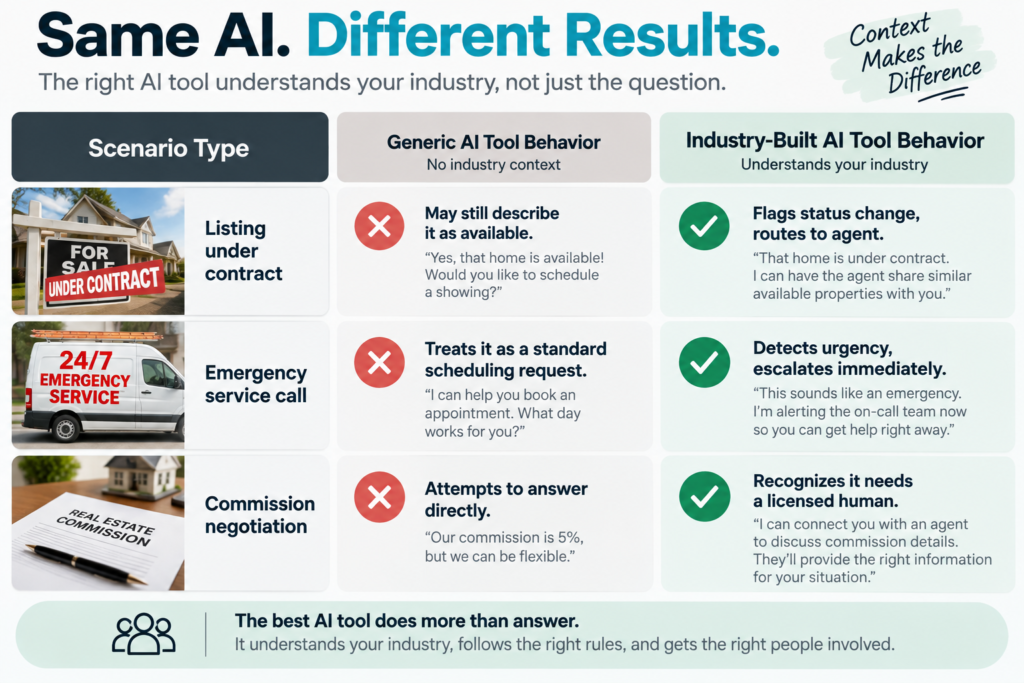
The second question is how the AI tool behaves when a situation falls outside the standard script, since easy cases rarely reveal whether a tool understands your industry, but edge cases always do. Every AI vendor can show you a smooth exchange where a customer asks a simple question and gets a clean answer. The real test is what happens when the conversation gets complicated in a way that’s specific to your field.
In real estate, ask the vendor how their tool handles a buyer asking about a property that just went under contract, or a seller lead who wants to negotiate commission before a single showing happens. A tool with real industry grounding should recognize these as moments to route to a human agent, not attempt to close the deal itself.
An AI tool that tries to answer every question is more dangerous than one that knows when to step aside.
In home services, ask how the tool handles an emergency call, such as a gas leak or a flooded basement, versus a routine appointment request. This is a genuine safety and liability question, not just a workflow preference. A tool built for home service work should immediately flag urgent language and either escalate to a live person or trigger a priority dispatch, rather than scheduling it for next Tuesday like any other job.
Question Three: What Happens When the AI Needs to Hand Off to a Person?
The third question is how quickly and cleanly the AI tool hands off to a human when the conversation exceeds its authority, and this handoff process, more than any single feature, determines whether the tool builds trust with your customers or damages it. Every AI tool will eventually hit a question it shouldn’t answer alone. What matters is whether that handoff feels seamless to the customer or leaves them stuck talking to a wall.
Ask the real estate vendor how a lead gets transferred once the AI determines a live agent is needed. Does the agent get full context, including the property address and the buyer’s stated timeline, or do they start from zero? Losing that context wastes the lead’s time and often costs the deal. A tool like EchoAssist AI, for example, is designed to keep that context intact through the handoff so agents aren’t starting cold.
Ask the home service vendor the same thing about a technician or office staff picking up an escalated call. If a customer describes a complex issue to the AI and then has to repeat everything to a human, that’s a sign the tool wasn’t built with a real handoff process in mind.
A good handoff preserves context. A bad one makes the customer start over.
- Ask what information transfers automatically during a handoff.
- Ask how fast a human is notified once escalation is triggered.
- Ask what the customer sees during the wait, if there is one.
Why Does This Distinction Actually Matter?
This distinction matters because a mismatched AI tool doesn’t just underperform, it actively damages customer trust by giving wrong information about listings, mishandling emergencies, or forcing customers to repeat themselves during a handoff. The cost of a generic tool isn’t just wasted subscription fees. It’s a missed lead, a frustrated homeowner, or worse, a genuine safety issue left unaddressed because the AI didn’t recognize urgency.
The pattern I see across client conversations is that owners often discover the mismatch only after a bad interaction, not during the sales process. Asking these three questions up front costs you twenty minutes on a vendor call. Discovering the answers the hard way costs a lead, a review, or a customer relationship.
Frequently Asked Questions
How do I know if an AI tool is actually built for real estate?
You know by testing it against real MLS data and real edge cases, not by trusting a marketing page. Ask the vendor to demonstrate the tool using an active listing from your market and see whether it correctly interprets status, contingencies, and agent shorthand. If the vendor can only show pre-built demo scenarios, that’s a signal the tool wasn’t designed around your actual data.
What questions should I ask an AI vendor before buying?
Ask about data compatibility, edge case handling, and human handoff quality, since these three areas expose whether a tool understands your industry or was adapted from a generic product. Specifically, ask how the tool reads your existing data source, how it handles urgent or unusual scenarios, and what information transfers when it escalates to a person.
Why does generic AI fail at home service business needs?
Generic AI fails because it can’t distinguish between a routine service request and an emergency, which is a distinction that directly affects safety and customer trust. Home service work involves urgency levels, licensing requirements, and scheduling logic that a general-purpose chatbot was never trained to recognize.
What is the difference between generic AI and industry-specific AI tools?
Generic AI tools process general conversation without understanding the specific data structures of a field, while industry-specific AI tools are trained around the actual workflows, terminology, and edge cases of that field. The practical difference shows up the moment a conversation involves specialized information, like an MLS field code or a job dispatch priority.
Can an AI tool built for one industry work in another?
Rarely without significant retraining, because the data structures and edge cases differ too much between fields like real estate and home services. A tool tuned to interpret MLS listings has no inherent understanding of service dispatch priorities, and vice versa.
How long does it take to evaluate an AI vendor properly?
A thorough evaluation using the three questions in this post typically takes one live demo call, roughly thirty to forty-five minutes, if the vendor is prepared to show real data and real edge cases. Vendors unwilling to do this in real time are often not confident in how their tool performs outside a scripted demo.
What is a red flag when evaluating AI tools for my business?
A red flag is vague language like “AI-powered” without specifics on what data the tool reads or how it handles unusual situations. Another red flag is a vendor who can’t explain what happens during a handoff to a human being.
Next Steps
Asking the right questions up front saves you from a costly mismatch later. If you want to see what an AI tool actually built for real estate and home service work looks like in practice, review the options designed specifically for these industries. See the tools built for real estate and service businesses here.