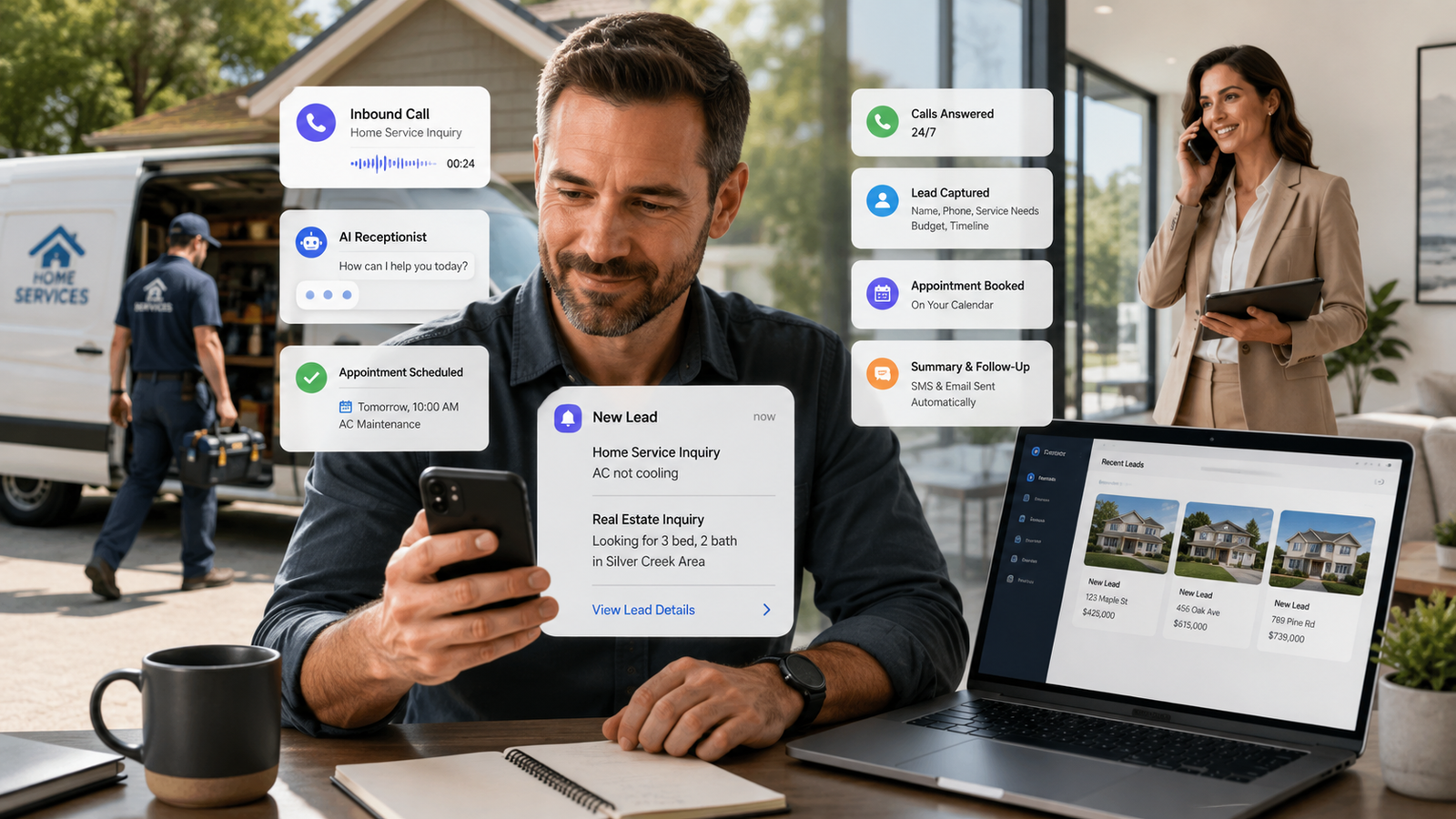
You are on a roof, or in a listing appointment, or elbow-deep in a water heater, and your phone rings. You cannot answer it. Nobody could, not while doing the actual work that pays the bills.
That call goes to voicemail. Or it just rings out. Either way, the person on the other end is not going to sit and wait for you to call back. They are going to call the next name on their list.
Here is the direct answer: an AI receptionist is a phone system that answers every call live, using a script and a set of questions built around your specific business, then delivers the details to you the moment the call ends. It does not replace you. It does the one job you physically cannot do while you are already doing your job, which is answer the phone.
For agents and service owners who are the entire operation, that difference is not a convenience. It is the gap between a lead that turns into a booked job and a lead that goes to whoever answered first.
Key Takeaways
- An AI receptionist answers calls live, in real time, using questions built around your services, hours, and service area.
- It does not replace you. It replaces voicemail, and it replaces the ringing-out that happens when you are already on a call or on a job.
- The setup determines the outcome. A generic script sounds generic. A script built from your actual qualifying questions sounds like your business.
- Speed matters more than most owners realize. Research from Harvard Business Review and MIT found that leads contacted within five minutes are roughly 21 times more likely to be qualified than leads contacted after thirty minutes.
- You keep control over anything that needs a human judgment call. The system routes, notifies, and books. It does not make decisions you have not already told it how to make.
Why Missing Calls Feels Like the Cost of Doing the Work
If you are a real estate agent or a service business owner, your day does not leave room for a desk and a phone. You are showing a house, running a service call, or driving to the next job. The work that earns money is the same work that keeps you from answering the phone that would earn more of it.
I hear a version of the same story constantly. An agent shows three houses back to back and comes up for air to find two missed calls and a voicemail nobody left. A plumber finishes a job, checks his phone, and sees a missed call from a number he does not recognize, from forty minutes ago. By the time he calls back, that person has already found someone else.
This is not a productivity problem you can fix by trying harder. You cannot answer the phone and do the work at the same time. Something has to give, and right now, for most owners, it is the phone.
The instinct is to treat this as minor. A missed call, you figure, is not a lost customer, just a delay. But a delay is exactly what it is not. The person calling is not browsing. They picked up the phone because they need something now, and the moment you do not answer, they are already dialing the next name.
What the Research Actually Shows
The numbers on this are not close.
Harvard Business Review and MIT studied lead response times and found that contacting a lead within five minutes makes a business roughly 21 times more likely to qualify that lead than waiting thirty minutes. That is not a small edge. That is the difference between winning the job and never being in the conversation.
BIA Advisory Services, which tracks how local businesses handle phone calls, has found that phone leads convert at ten to fifteen times the rate of a web form submission. A person who calls you has already decided you might be the answer. They are past the browsing stage. Losing that call is not losing a cold lead, it is losing someone who was ready to move.
What happens to the calls you do not answer is its own problem. Data cited by Forbes and BIA Advisory Services shows that roughly three out of every four calls placed after business hours go to voicemail and never get a callback, because the caller simply does not leave one. Ruby Receptionist’s own data backs this up: the large majority of callers who reach voicemail hang up without saying a word.
Put those together and the picture is simple. Most missed calls are gone the moment they are missed, not because the caller is being difficult, but because they never intended to wait around.
The Real Problem Is Not the Phone. It Is What Happens on It.
Most owners think the fix is just picking up more often, or hiring someone to sit by the phone. But the real issue is not whether the call gets answered. It is whether whoever answers it, human or AI, actually knows enough about your business to handle the call correctly.
An AI receptionist that has not been set up with your actual business details is just a fancier voicemail. It will sound polite and say nothing useful. The caller will hang up just as frustrated as if no one answered at all.
The businesses that get real results from an AI receptionist are the ones that treat the setup as the actual product, not the software. What matters is whether the system knows your service area, your hours, which jobs you take and which you do not, what counts as an emergency for your business, and the exact questions you would ask a caller yourself if you picked up. Get that right, and the caller cannot tell the difference between the AI and a well-trained person at your front desk. Get it wrong, and you have built an expensive voicemail machine.
How This Actually Works, Call by Call
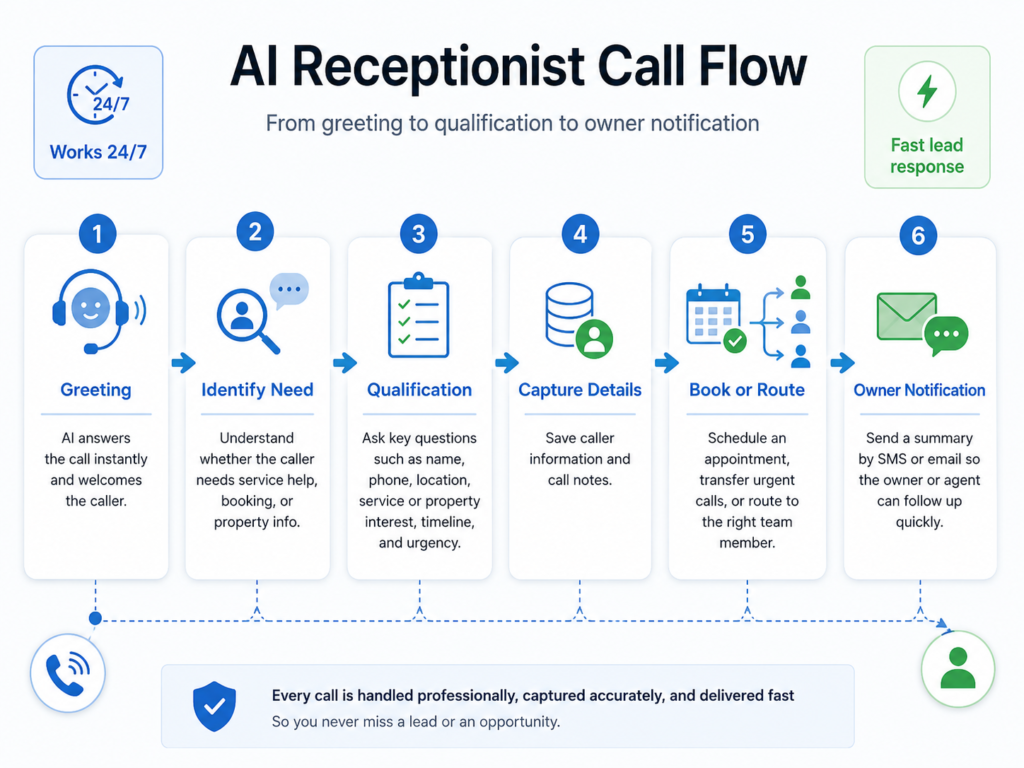
Here is what a call looks like once an AI receptionist is set up correctly for a home-service or real-estate business.
The phone rings. It is answered on the first or second ring, every time, twenty-four hours a day, whether you are on a roof, in a showing, or asleep. The greeting uses your business name and sounds like your business, not a generic answering service.
The caller explains what they need. For a service business, that might be a leaking pipe, a broken AC unit, or a request for a quote. For a real estate agent, it might be a question about a specific listing or interest in scheduling a showing. The system asks the qualifying questions you would ask yourself: service address, urgency, what has already been tried, budget range, timeline, or which property they are calling about.
Based on the answers, the call routes the way you decided it should. An emergency pipe burst might trigger an immediate text to your phone with the caller’s number and address. A general question might get logged and scheduled for a callback within your normal window. A showing request might go straight into your booking system.
The second the call ends, you get the details. Not a vague “someone called.” The actual notes: who called, what they need, what they said, and what happens next. If you use a CRM, that information can land there directly instead of living in a scribbled note on your dashboard.
You stay in control of anything that needs your judgment. The AI does not negotiate price, does not make a commitment on your behalf that you have not authorized, and does not pretend to know something it does not. It gathers information and routes it. You still decide.
This is the part people misunderstand about AI receptionists. The AI is not the personal touch. I am. The system answers the phone the same way every time, sounding like your business. The relationship, the follow-up, the judgment calls, that is still entirely yours. I build the system to fit how your business actually runs, then I get out of the way and let it work.
What to Set Up Before Your AI Receptionist Ever Takes a Call
The following is what determines whether your AI receptionist sounds like your business or sounds like nobody’s business. Work through these before your first call goes live.
- Write down your actual service area, in plain language. Not just a city name. The specific neighborhoods, zip codes, or radius you will drive to, and what happens with a call from outside that area.
- List every job type you take and every one you turn down. If you do not do gas line work, or you do not show houses under a certain price point, the system needs to know that before a caller does.
- Define what counts as an emergency for your business. A burst pipe is not the same urgency as a slow drain. A same-day showing request is not the same as a general inquiry. Different urgency levels should trigger different responses.
- Write the exact questions you would ask a caller yourself. Think about the last five calls you took. What did you actually ask them? That list becomes the qualification script.
- Decide your hours and what happens outside them. After-hours calls do not need to disappear into a voicemail box. Decide what response is appropriate at 9 PM versus 9 AM.
- Set your escalation rule. Some calls should reach you immediately, no matter what you are doing. Others can wait for your next natural break. Be specific about which is which.
- Choose where the call details land. A text, an email, a CRM entry, or all three. The best system in the world is useless if the information does not reach you in a place you actually check.
Frequently Asked Questions
Will an AI receptionist sound robotic to my callers?
Only if it is set up with a generic script. A system built around your actual business details, service area, and the questions you would ask yourself sounds like a trained person answering your phone, not a robot reading a menu. The quality of the setup determines the quality of the caller experience.
Do I lose control over how my business is represented on the phone?
No. You decide the questions, the tone, the service area, and the escalation rules ahead of time. The system follows what you set. Anything requiring judgment, like pricing negotiation or a scheduling exception, routes back to you instead of being decided automatically.
Is this different from just texting leads back later?
Yes. Texting still requires you to see the message and respond, which runs into the same time problem as a phone call. An AI receptionist answers live, in the moment the caller reaches out, when their intent is highest and before they call the next business on their list.
What happens to calls outside my service area or outside the jobs I take?
You decide that in setup. Some owners want those calls politely declined with a referral note. Others want every call logged in case the caller has a friend in the right area. Either way, it follows the rule you set instead of guessing.
How fast can I actually get an AI receptionist running for my business?
Setup time depends on how clear your business details are going in. Owners who come in with their service area, hours, and qualifying questions already written down move fastest. The system itself can start answering calls almost immediately once your business profile is built.
The Phone Was Never the Problem. What Happens When It Rings Was.
Nobody starts a service business or a real estate career because they wanted to run a call center. You wanted to do the work. Fix the problem, close the deal, help the person standing in front of you.
But every call you cannot take is a customer deciding, in real time, whether your business is the one that shows up. An AI receptionist does not change what you are good at. It just makes sure the phone stops being the reason a good lead never becomes a customer.
Set it up right, with your real questions and your real business behind it, and it stops being software. It becomes the front door that is always open, even when you cannot be standing at it.
Keep Learning
- How Missed Calls Become Lost Revenue for Service Businesses — How to estimate what unanswered calls are actually costing your business.
- Why Voicemail Is Not a Lead-Response Strategy — The case against voicemail as a fallback, and what a prospect actually experiences when they hit it.
- The First Five Minutes After a Lead Calls: A Practical Follow-Up System — A framework for what should happen the moment a lead is captured, from notification to booking.
- What an AI Receptionist Should Know About Your Business Before It Answers a Call — A deeper look at the specific business details, from service area to escalation rules, that determine whether your AI receptionist sounds like you.
About the Author
Derrick Houston is the founder and CEO of DH Digital Consulting, LLC, based in Dallas-Fort Worth, Texas. He built EchoAssist, an AI receptionist service, for real estate agents and service business owners who lose leads to missed calls while they are out doing the work that earns them. Derrick works directly with each client to build their AI receptionist around how their business actually runs, rather than handing over generic software. Contact: dhdigitalconsulting@gmail.com or (469) 689-1107.