

TLDR
What to automate first comes down to one test: find the task that costs you the most hours each week and puts the most leads at risk when it slips, then automate that task alone before touching anything else. Owners who try to automate everything at once usually finish nothing. The ones who pick a single bottleneck, fix it, and measure the result build momentum they can repeat.
Deciding what to automate first is not a technology question. It is a triage question. Every business has a dozen tasks that feel automatable, from appointment reminders to invoice follow-up to social media posting. Trying to fix all of them at once is how automation projects stall out before they produce anything useful.
What to automate first means identifying the single task in your business that costs the most time and risks the most lost revenue when it is handled manually or handled late. That definition matters because it separates busywork from bottlenecks. A task can feel tedious without actually threatening the business. A task can also be quick to do and still cost you real money every time it is delayed.
Key Takeaways
- Score every candidate task by hours lost per week multiplied by risk when delayed.
- The highest score, not the most annoying task, is what to automate first.
- Lead response speed usually wins because delayed replies often cost the customer outright.
- Leave low-frequency or still-evolving tasks alone until the process is stable.
- Confirm measurable impact before moving to the second automation target.
What should you automate first in your business?
The task you should automate first is the one where a delay directly costs you money or customers, not simply the task that annoys you the most. Many owners default to automating whatever irritates them daily, like scheduling or data entry, when the real leak is somewhere less visible, such as slow response time to new inquiries. The fix starts with measuring impact, not irritation.
Two questions get you there fast.
- How many hours per week does this task consume, including the follow-up and cleanup it generates?
- What happens to a lead or customer when this task is delayed by an hour, a day, or a week?
A task that scores high on both counts is your starting point. A task that scores high on time but low on lead risk, like filing paperwork, can wait. A task that scores low on time but high on lead risk, like answering after-hours calls, often deserves attention sooner than its time cost suggests.
The task worth automating first is not the most annoying one, it is the one that costs you a lead every time it gets delayed.
The two-question test for what to automate first
The two-question test scores every candidate task on time lost per week and revenue risk per delay, then ranks tasks by the combined score so you can see the true bottleneck instead of the loudest complaint. This removes guesswork and gives you a defensible answer when someone asks why you started where you did.
Here is how to run it. List every recurring task that currently eats staff or owner time. For each one, estimate hours lost weekly and rate the lead or revenue risk from one to five when that task is delayed. Multiply time lost by risk rating. The highest number wins.
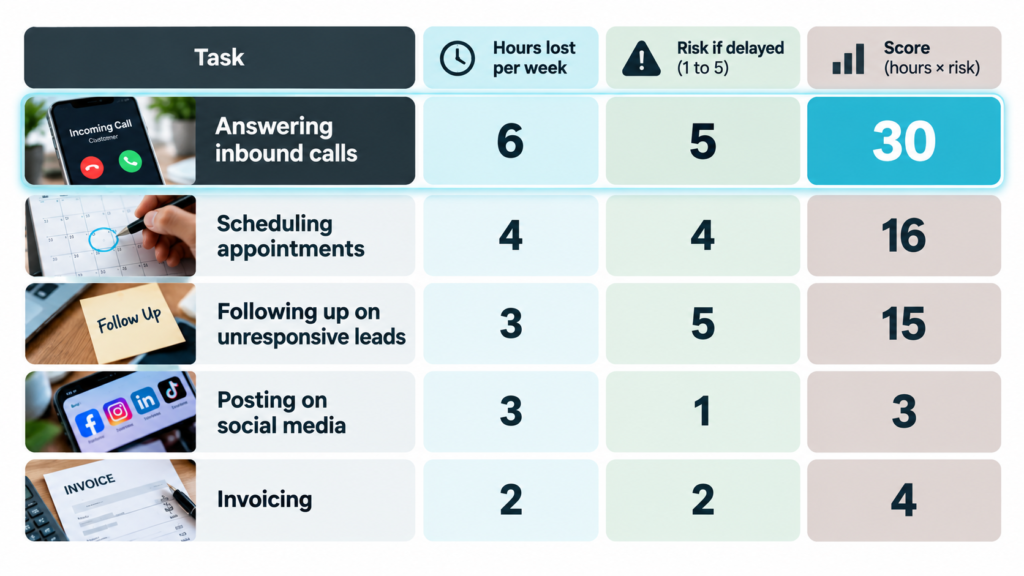 In the example above, answering inbound calls scores highest, not because it takes the most hours, but because a missed call carries the most risk. That is the pattern worth watching for in your own numbers.
Why lead response speed usually wins the test
Lead response speed usually wins because a delayed reply to a new inquiry often means the prospect has already called a competitor, which makes the cost of delay immediate and permanent rather than gradual. Tasks like invoicing or reporting are important, but a late invoice rarely loses the customer. A late response to a new lead frequently does.
This is why phone handling and initial follow-up show up so often as the correct first automation target. It is not a trend, it is math. The task with the shortest window between delay and lost opportunity deserves the fastest fix.
A late invoice costs you interest. A late response to a new lead costs you the customer.
Consider how this plays out with a service business relying on Facebook Marketplace inquiries or a real estate agent working leads pulled from the MLS. Both depend on speed. A prospect messaging at 9 p.m. is not waiting until 9 a.m. to hear back from someone else too.
What tasks should you leave alone for now?
Leave alone any task that is low frequency, low risk when delayed, or still evolving in how you want it done, since automating an unstable process just locks in the wrong steps faster. Automation works best on processes you already understand well enough to describe in a straight line, step one through step five, with no exceptions buried in someone’s head.
- Tasks you do less than once a week
- Tasks where the steps still change often
- Tasks where a delay costs annoyance but not revenue
- Tasks that require judgment calls you have not yet standardized
A quick win, in this context, is not the flashiest tool you can install. It is the smallest change that removes the biggest bottleneck. Owners often reach for the automation that is easiest to set up rather than the one that matters most. That order should be reversed.
How does a tool like EchoAssist AI fit into this decision?
EchoAssist AI is an AI receptionist built to answer calls, capture lead details, and route messages so inbound inquiries get a response even when no one is available to pick up the phone. For businesses where the scoring test points to call handling or lead response as the top bottleneck, this is the category of tool that addresses it directly rather than adding another system to manage.
Tools like GoHighLevel handle the follow-up sequence once a lead is captured. Notion can hold the process documentation once a workflow is standardized. But the first gap for many small businesses sits earlier, at the moment someone calls and nobody answers. That gap is what an AI receptionist is designed to close.
Automation should close the gap between when a customer reaches out and when someone responds, not add another step to your own to-do list.
Xanda Ltd frames this same idea around five criteria: high volume, rule-based, error-prone, time-consuming but low-skill, and bottlenecking. A missed-call problem checks nearly all five boxes, which is part of why it so often surfaces as the correct starting point once owners actually run the numbers instead of guessing.
Comparing automation starting points
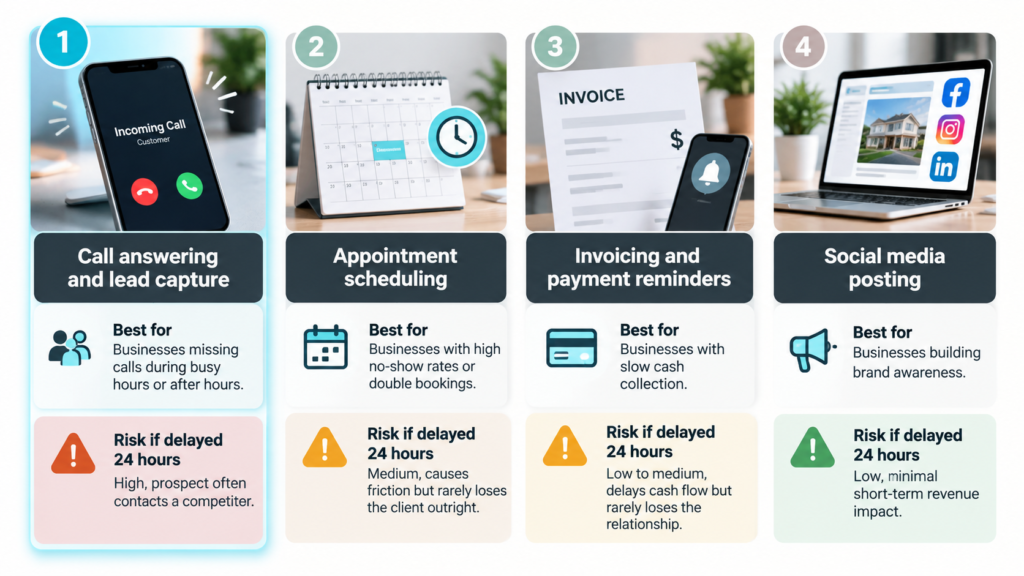
Bizagi’s process prioritization work makes a similar point using impact, readiness, and effort as the three variables. The advice lands the same way regardless of framework: start small, start aligned to a real objective, and resist the urge to automate everything in one push.
Practical Ecommerce’s guidance on small business automation adds another layer worth noting. Automate the tasks that will not scale with you as you grow, and confirm the automation actually saves measurable time or money before calling it done. That confirmation step is easy to skip and it should not be.
What does momentum look like after the first automation?
Momentum looks like a measurable drop in the specific number you tracked before automating, whether that is missed calls per week, hours spent on manual follow-up, or leads that went cold without a response. Once that number moves, the second automation target becomes obvious because you already have a process for measuring impact.
Townsquare Interactive’s research on small business prioritization lands on the same conclusion from a different direction: pick the one task costing the most time or money, get it working, then add the next one. That sequencing, one fix at a time with a clear before-and-after number, is what separates automation that sticks from automation that gets abandoned three months in.
Fun Fact
Expert Insight
In my work with real estate agents and small service business owners, the task that scores highest on the time-versus-risk test is almost always phone handling, not because owners do not know it matters, but because they have never measured it against everything else competing for attention. Once they see the number side by side with scheduling or invoicing, the decision makes itself.
Frequently Asked Questions
How do I know what to automate first?
You know what to automate first by scoring each recurring task on hours lost per week and the risk of delaying it, then picking the task with the highest combined score. This removes guesswork and stops you from automating the task that simply annoys you most instead of the one costing you real money.
What is the biggest mistake when automating a small business?
The biggest mistake is trying to automate several tasks at once instead of one. This spreads attention thin, delays results, and makes it hard to tell which change actually caused any improvement, so most owners abandon the project before it produces anything measurable.
Should I automate lead follow-up before scheduling?
In most cases, yes, because a delayed lead response often costs the customer entirely while a delayed scheduling confirmation usually just creates friction. Run both through the time-versus-risk test for your own business to confirm which one scores higher before deciding.
What is a quick win in automation?
A quick win is the smallest automation change that removes the single biggest bottleneck in your business, not the easiest tool to install. Owners often confuse the two and end up automating something low-impact simply because it was convenient to set up.
How long should I wait before automating a second task?
Wait until you can measure a clear before-and-after result on the first automation, such as fewer missed calls or fewer hours spent on manual follow-up. Once that number moves in the right direction, you have a repeatable process for picking and confirming the next target.
Can automation fix a process that keeps changing?
No, automation works best on a process that already has a stable, repeatable sequence of steps. Automating a process that is still evolving locks in the wrong steps and often creates more cleanup work than it saves.
Next Steps
If the scoring test points to missed calls or slow lead response as your top bottleneck, that is a specific, solvable gap. See where EchoAssist fits into your workflow here.